

TL;DR: If you’d like to speed up your agentic app development but don’t want to read how, simply give my tools Xcode Runner and Remote Xcode Runner (for a Mac mini) to your agent to run for you! Paid subscribers get these automatically.
Before agentic development, I was extremely happy with my MacBook Pro. It’s an impressive machine that never gave me problems. But as soon as Opus 5.5 came out, and I was able to really really push my app development to the limit, DeviceHub became THE LIMIT. With the addition of the extra extra extra extra slow iPhone Duo simulator… suddenly all agentic sessions and my powerful M3 MacBook pro came to a halt. I had to slow down and fix this to move forward with the speed of my imagination!
DeviceHub: The Perfect Storm
I knew simulators were slow of course, but before AI, I just ran one at a time to test what I was building. I just lived with it and it was fine. In other words, I settled.
I asked Claude why simulators are so slow, and it’s truly an Apple engineering disaster. Here are some crazy facts:
Each simulator is like running an actual iPhone inside your Mac!! Each simulator loads as many as 300 background programs!!! including things like wallpapers, widgets, calendar, health, etc etc!!!! OMG!!!
As a result, each simulator is about 9 GBs of memory!!! OMG!!!
I like this description from Claude: A CPU storm every time one boots. Basically, just booting one simulator runs the CPU 300 - 450% above normal for about a minute!!! OMG!!!!
Now imagine several agents doing this at the same time… I was lucky my MacBook Pro is still alive!!!!
Renting a Mac mini for My Agents 😎
Ok, so determined to fix this problem, and mostly save my MacBook Pro!!!! I started by renting a Mac mini. I’m a digital nomad, so I cannot buy one since I don’t have a home to put it in (… adding buying a home my todo list for the agentic era 🫠). But if you do have the resources, I do highly recommend getting a Mac mini for your agents to run things on as soon as possible!!
I thought there was something up with my MacBook Pro that limited how many simulators it could run… this will surely be better on a dedicated empty Mac Mini, right?!!! WRONG!!! Claude could at most run 3 simulators at a time!!! Check why above (hint: 3 simulators * 9 GB each, + 300% CPU increase to load each one… + Xcode + any other standard things on even a clean mac).
I then tried everything to get the setup working better for my agents…
Headless Xcode
I’ve never used these before, but Xcode comes with several CLI tools, which are installed to your Mac every time you install a new Xcode version (Install Command Line Tools!). This is perfect for agents to work with across many projects at once, since they never have to manage navigating the Xcode app.
The tools include:
xcodebuild- builds and runs your app and testsxcrun simctl- controls simulators, including taking screenshots and screen recordings (super useful in many many ways!!! will write about this later).swift build- build Swift packagesswift test- test Swift packages. No simulators needed for unit tests 🎉xcodeproj- new in Xcode 27.2!!! This allows agent to edit Xcode project file!!! THANK YOU APPLE!!!xcrun mcp-server- also new in Xcode 27.2!!! It allows agents to run Xcode new MCP server. This is especially useful for getting SwiftUI previews without opening Xcode :)
I’ve seen that other devs are building tools using these tools, but I’m personally very visual, so I love using Xcode. However, this opens up A LOT of opportunities for fixing the app development process for many teams!! Again, THANK YOU APPLE for continuing to make Xcode agent-friendly!
I worked with Claude to build myself an xcode-runner for my local machine and a remote-xcode-runner for the Mac mini CLI tools + skills so that my agents know how to manage running my projects headlessly and much more. The optimizations I mention moving forward in this blog posts are included in these tools. Paid subscribers get these tools automatically.
The Queue
Next, I worked with Claude to build a queue system into the CLI tool for agents to use. Here is how it works:
The agent asks to claim a simulator
If the slot is free, the Mac mini boots and allocates a new simulator just for the agent.
If other agents are simulator maaaaxiing, the agent waits for up to 9 minutes. It then tells me that no simulator is available (so I can stop any other sessions if needed). Meanwhile, the agent can continue working on things that do not require a simulator.
When an agent is done using the simulator, it deletes the simulator and opens up the slot for the next agent.
Improving the Queue
The main use-case for an agent using the simulator is to run UI tests to verify it’s work. There are several things things I did to improve this:
Small Useful Tests
So… agents LOVE writing tests, so they often overdo it and then every small change in the code needs the full UI testing suite running! The queue won’t solve this problem much… since now every agent needs to run each simulator for an hour after each little code change…
I won’t go into much detail on the exact fix here, as it’s a whole other blog post, but basically I structure my tests in a way that agents write smaller tests and run only the necessary ones that are necessary for the code change. The result is that each agent needs the simulator for less than a minute the majority of the time! If you want to implement this system, you can check out my verification tools.
SwiftUI Previews First
Remember how I mentioned that agents can use the xcrun mcp-server CLI tool to get SwiftUI Previews? Well, my agents are instructed to use SwiftUI Previews as the first line of verification (e.g. for a text change on a screen), and to only run the simulator for code changes that need them (e.g. testing a transition across screens or an animation).
Something fun - I also like to see the previews to review them, but I hate plain screenshots, so I have my agent adds bezels to them via my SwiftUI Preview tool.
Keeping the Simulators Warm
If no other agents are waiting for a simulator, the agent’s specific simulator is kept loaded and warm for it to use on other tasks it needs until it finishes the task and deletes it.
Slim Simulators 🎽
This is the piece I was missing!!! I asked about this on X, and while many had the same issue, I got it resolved!

THANK YOU MobiAI-App for releasing an open source simslim library!!! This library is a MUST HAVE.
Remember how I mentioned that each simulator is 9 GBs due to all the random unnecessary things it loads and runs in the background?!! Well, this library “slims” it down to only what is necessary to run your app!!! Just a life-saver. Really wish Apple built this in as the default option!!!
Here are the numbers comparing running the full simulator vs the slim one as per Claude’s tests:
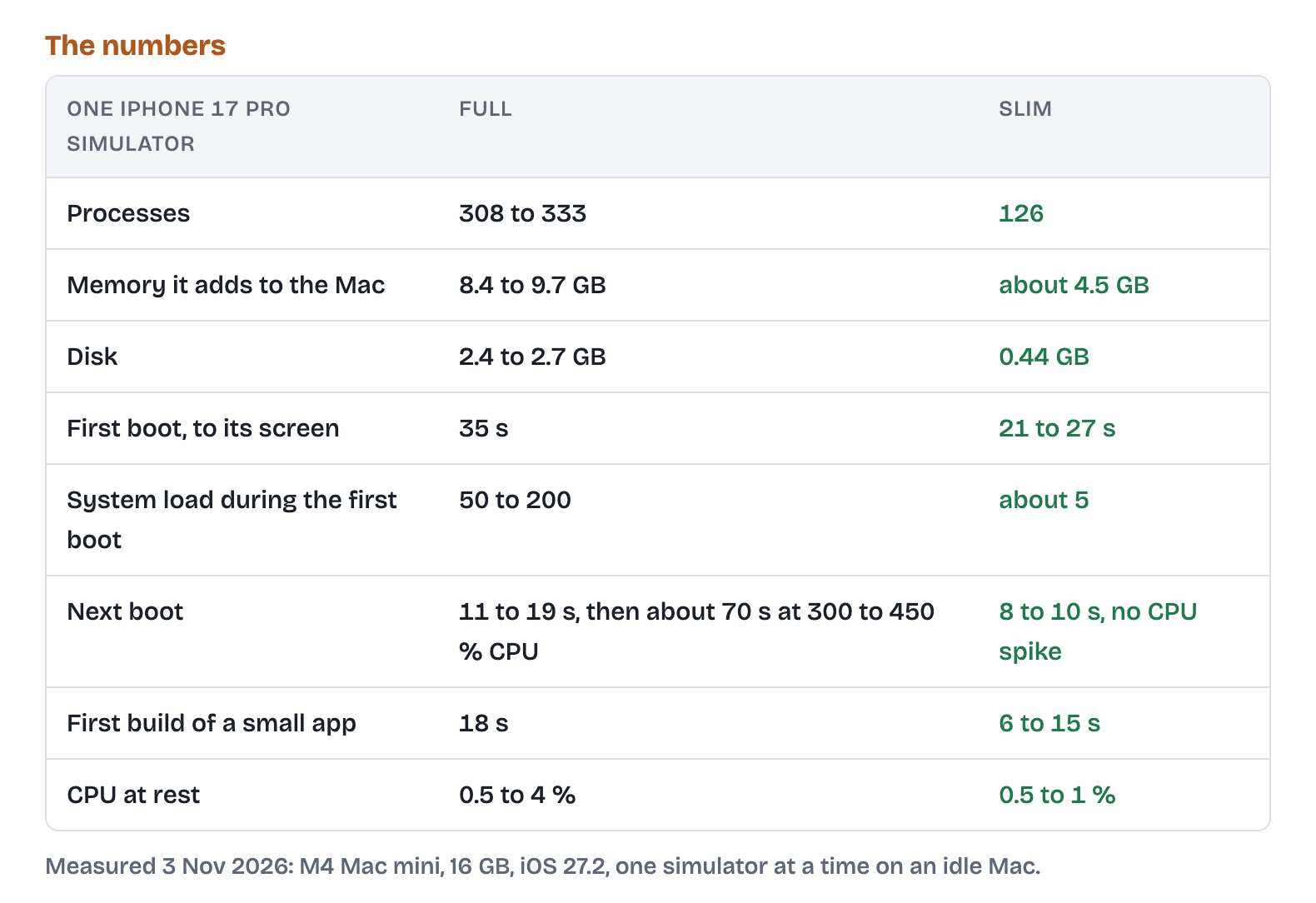
Just WOW!!!
Conclusion
I’m also seeing some companies starting to build cloud simulators and web-based ones. So I think we will see A LOT in this space, as this is a really really really big bottle-neck for agentic app development.
In the meantime, I LOVE my new setup. It is soooooo fast now!!! Reminder to slow down to rethink your workflows first before speeding up with agents!!
I’ll be sharing a lot more of my techniques and learnings, so make sure to subscribe! Note that paid subscribers get the tools I blog about automatically :)
It’s interesting that you and I have come up with a lot of the same strategies. For most of my time developing iOS and Mac apps I have been using a MacBook Neo. It of RAM doesn’t really allow you to do much as far as run many simulators. So Claude and I came up with a strategy to have slots for building with Xcode and a slot for the simulator. We have a strategy for erasing simulators when a chat is done with the project, but closing them in between so that the next check can use it without having to boot it all the way up again. Will you add VoiceOver to the mix? This gets a little bit tricky. Now that I’ve got a MacBook Pro. I’m still using those strategies even though I’ve got more ram to work with and more storage, but they’re good ones to have and I find it because I do use those rarely is Claude trip over its own feet and my Mac doesn’t seem to have any problems. Bell be curious to hear how you’re renting goes and how things work. Do you believe you’ll still use the same strategies with the rented Mac mini?